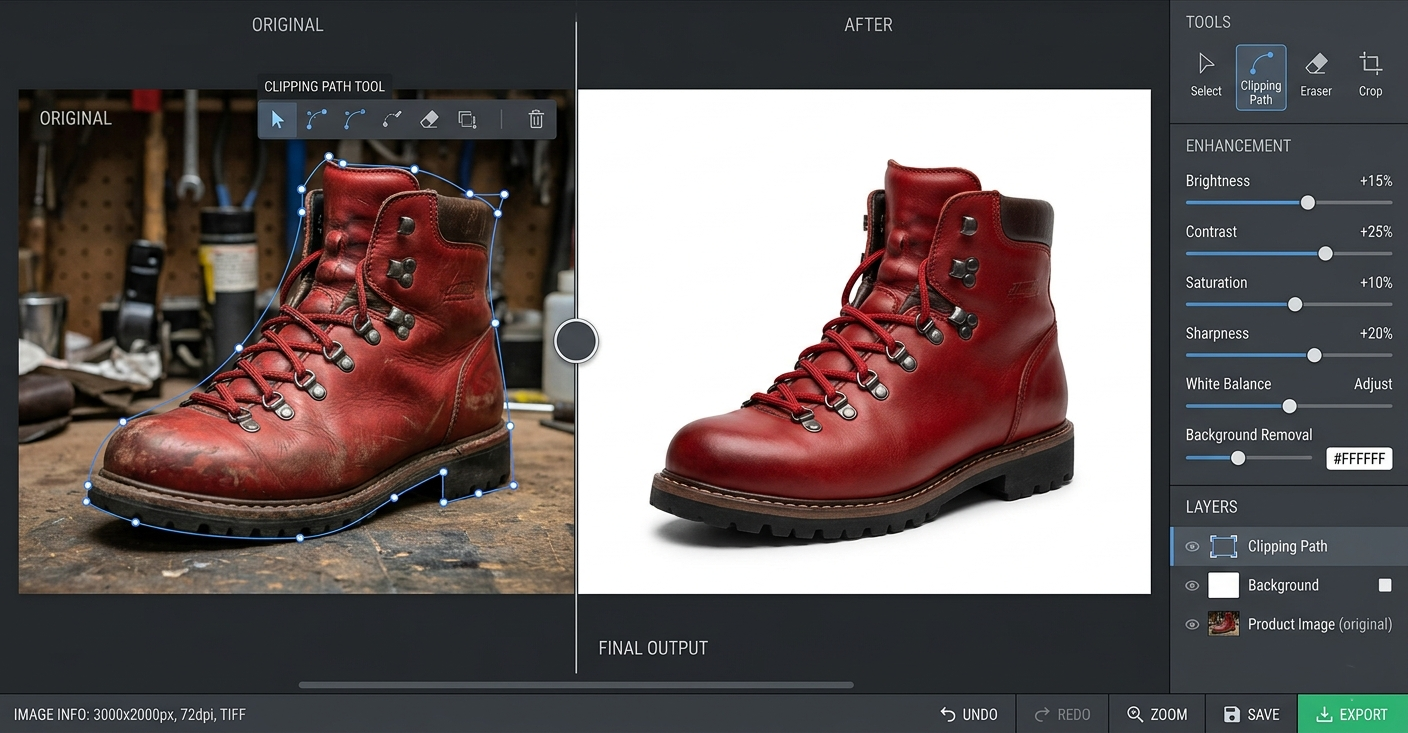
The phrase application edit photo is searched by people who want real control over their images, not gimmicks. They are looking for applications that can truly edit photos with intention, consistency, and quality. Not just filters. Not one-tap effects. Real editing.
This guide is written from hands-on experience. It explains how a serious application edit photo workflow actually works, which types of apps matter, how professionals think when they edit photos using applications, and how to avoid the shortcuts that damage image quality. Everything here reflects the long-term editing philosophy practiced at Lumere Touch, where photo editing is treated as a craft, not decoration.
This is not a list of trendy apps. It is a deep, practical breakdown of how photo editing applications are used properly.
What “Application Edit Photo” Really Means
When people search for an application to edit photos, they usually mean one of three things:
An app to edit photos on mobile
A desktop application to edit photos professionally
A workflow that allows consistent photo editing using applications
The problem is that most content treats all photo editing apps as equal. They are not.
An application edit photo process is only as good as:
The file quality you start with
The depth of control the app provides
The editor’s understanding of image fundamentals
At Lumere Touchch, we evaluate photo editing applications based on output quality, not popularity.
The Difference Between Editing Photos and Applying Filters
This distinction matters more than people realize.
Filters
Apply preset changes blindly
Ignore image-specific needs
Reduce creative control
Often degrades image quality
Real Photo Editing Applications
Allow exposure, color, and tone control
Preserve dynamic range
Support non-destructive workflows
Adapt to each image
A true application edit photo workflow always favors editing over filtering.
Types of Application Edit Photo Tools
Mobile Photo Editing Applications
Used for convenience, speed, and lightweight workflows.
Common characteristics:
Touch-based controls
Limited color depth
Compressed exports
Fast sharing
Useful when used correctly, but not suitable for all use cases.
Desktop Photo Editing Applications
Designed for quality, precision, and professional output.
Characteristics:
Full RAW support
Advanced color management
Layer-based editing
High-resolution export
At Lumere Touch, desktop applications are the backbone of serious editing.
Core Features Every Good Photo Editing Application Must Have
If an app lacks these, it is not suitable for serious photo editing work.
1. RAW File Support
Without RAW support, highlight and shadow control are severely limited.
2. Non-Destructive Editing
Edits should never permanently alter the original image.
3. Precise Exposure Controls
Including highlights, shadows, whites, and blacks.
4. Color Management
White balance, HSL control, and color grading.
5. Export Control
Resolution, color space, and compression settings.
This is the baseline used at Lumere Touch to evaluate applications.
How Professionals Think When Using an Application to Edit Photos
Editing photos is not about “making it look better.” It is about making it accurate, intentional, and expressive.
Professional mindset:
Fix what the camera couldn’t capture correctly
Preserve what makes the image unique
Avoid overcorrection
Edit for context, not trends
A professional application edit photo workflow is slow, deliberate, and repeatable.
Step-by-Step Application Edit Photo Workflow
Step 1: Import and Evaluate
Before touching sliders:
Check exposure balance
Identify color casts
Notice the highlight and shadow limits
Step 2: Global Adjustments
Set exposure
Correct white balance
Adjust contrast gently
At lumere touch, global adjustments are subtle by design.
Step 3: Tonal Refinement
Control highlights without flattening
Lift shadows without washing the image
Protect midtones
Step 4: Color Editing
Reduce saturation first
Reintroduce color selectively
Avoid “perfect” color
Step 5: Local Adjustments
Guide attention
Reduce distractions
Enhance the subject subtly
This structured process applies across any serious photo editing application.
Common Mistakes When Using Application Edit Photo Tools
Over-sharpening
Excessive clarity
Over-saturated colors
Heavy presets layered repeatedly
Editing for screens only
At Lumere Touch, we see these mistakes most often in mobile-only workflows.
Mobile vs Desktop: Choosing the Right Application
| Mobile Application | Desktop Application |
|---|---|
| Fast and portable | High-quality output |
| Limited control | Full tonal range |
| Compressed files | Professional export |
| Good for social | Best for print & archive |
A balanced application edit photo strategy often uses both, but with clear roles.
Color Accuracy and Why Most Apps Fail
Many photo editing apps display colors inaccurately due to:
Screen limitations
Poor color profiles
Aggressive saturation defaults
Professional editing at Lumere Touch always includes:
Calibrated displays
Controlled color environments
Soft-proofing when needed
An application edit photo workflow is only as reliable as its color management.
Non-Destructive Editing and Why It Matters
Non-destructive editing allows:
Re-editing months later
Style consistency
Learning from past decisions
Applications that overwrite pixels permanently should never be part of a professional workflow.
Export Settings: The Most Ignored Step
A perfect edit can be destroyed during export.
Key export considerations:
Resolution based on use
Correct color space (sRGB, Adobe RGB)
Compression balance
At Lumere Touch, export presets are treated as seriously as editing presets.
Application Edit Photo for Different Use Cases
Portrait Photography
Skin tone accuracy
Natural contrast
Product Photography
Color fidelity
Edge sharpness
Background consistency
Artistic Photography
Emotional tone
Intentional imperfection
Creative color shifts
The same application can be used differently depending on intent.
Pros & Cons of Using Application Edit Photo Workflows
| Pros | Cons |
|---|---|
| Full creative control | Learning curve |
| Non-destructive edits | Time investment |
| Repeatable results | Requires discipline |
| Professional output | Hardware dependency |
| Adaptable across styles | Poor apps limit quality |
How Lumere Touch Approaches Application Edit Photo
At Lumere Touch, editing applications are tools, not shortcuts.
Core principles:
No one-click looks
No trend chasing
No destructive workflows
Long-term consistency
Every application edit photo process is built around understanding light, color, and human perception.
Building Your Own Editing Style with Applications
Style is not a preset.
Style develops from:
Repetition
Critical review
Time between edits
Honest comparison
Applications enable style, but they do not create it.
The Role of Restraint in Photo Editing Applications
Most images need less editing than you think.
Professional editors often:
Stop before the image feels “done.”
Leave imperfections intact
Let the image breathe
This restraint defines the lumere touch editing philosophy.
File Management Inside Photo Editing Applications
Disorganized files lead to inconsistent editing.
Best practices:
Logical folder structures
Version tracking
Backup systems
Application edit photo workflows must include file discipline.
Why Learning One Application Deeply Beats Using Many
Switching apps constantly prevents mastery.
At Lumere Touch, we recommend:
Choose one primary application
Learn it deeply
Build repeatable workflows
Depth always beats variety.
Frequently Asked Questions About Application Edit Photo
1. Is a mobile app enough for professional photo editing?
Only for limited use cases.
2. Do filters ruin image quality?
Often, yes, especially when stacked.
3. Should I always edit RAW files?
Yes, whenever possible.
4. Is non-destructive editing essential?
Absolutely.
5. Can one application handle all editing needs?
Rarely, but one can handle most.
6. Why do my edits look different on other screens?
Color management issues.
7. How long should editing take per photo?
As long as needed, not longer.
8. Is sharpening always necessary?
No, often it is overused.
9. Can editing apps replace good photography?
No application fixes poor capture.
10. Why follow Lumeree touch editing principles?
Because they prioritize quality, consistency, and longevity.