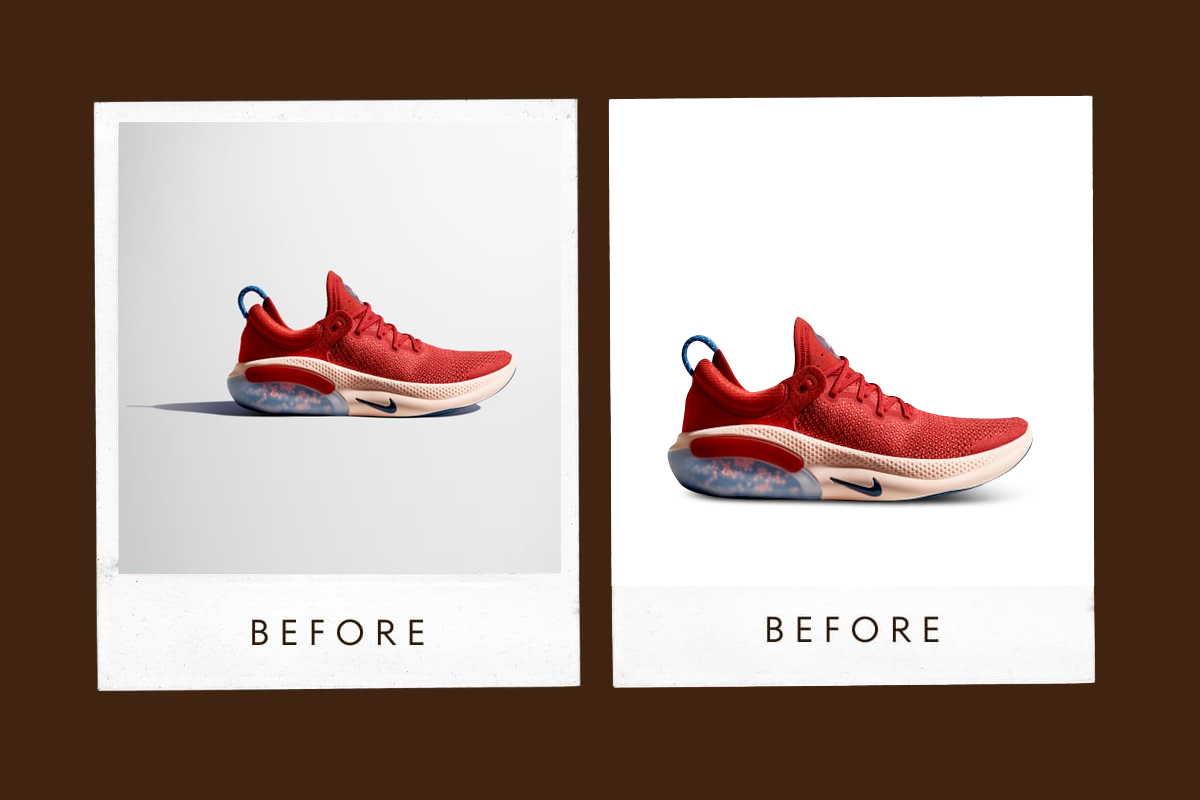

The phrase edit Product Photos for E-commerce is searched by people who already understand something important: product photos sell before words do. Whether the product is viewed on an e-commerce website, a marketplace, a catalog, or a mobile screen, the image determines trust, clarity, and conversion.
This page is written as practical page content with a blogging flow. It is not theory, not trends, and not software marketing. It reflects years of real production-level experience in editing product photos for brands that care about accuracy, consistency, and long-term credibility. The standards described here are the same principles used at Lumere Touch, where product photo editing is treated as a commercial craft, not a visual trick.
What does Edit Product Photos for E-commerce Actually Mean
Best practices are not shortcuts. They are repeatable decisions that protect product integrity while improving clarity and appeal.
The best practices for editing product photos focus on:
Visual accuracy
Brand consistency
Buyer trust
Platform compliance
Long-term scalability
Editing product photos is not about making products look better than they really are. It is about making them look clearly, honestly, and consistently real.
At Lumere Touch, every edit is evaluated against one question: Would this image still be trustworthy at high resolution, on any screen, next to a competitor’s product?
Why Editing Product Photos Requires a Different Mindset
Product photo editing is not artistic expression in the traditional sense. It is functional clarity.
Unlike portraits or creative photography:
The product must remain accurate
Color must match reality
Shape must not be altered
Texture must remain believable
The best practices for editing product photos protect the product first, aesthetics second.
Editing Product Photos Starts Before Editing
One of the most overlooked best practices is understanding that editing begins before opening editing software.
Strong product editing depends on:
Proper exposure
Controlled lighting
Sharp focus
Clean background
At Lumere Touch, editing product photos is never treated as a rescue mission. Editing refines; it does not fix poor capture.
Core Principles Behind the Best Practices for Editing Product Photos
1. Accuracy Over Drama
If the edited photo misrepresents the product, it fails—no matter how attractive it looks.
2. Consistency Across a Set
One strong image is not enough. A product line must look cohesive.
3. Non-Destructive Editing
All edits must be reversible to maintain flexibility.
4. Platform Awareness
Amazon, Shopify, catalogs, and ads all have different requirements.
These principles guide every professional workflow at Lumere Touch.
Color Accuracy: The Foundation of Editing Product Photos
Color errors are the fastest way to lose customer trust.
Best practices for editing product photos require:
Correct white balance
Controlled saturation
Avoidance of color shifts
Screen-to-screen consistency
A red product must be the same red across all images. At Lumere Touch, color accuracy is validated before export, not assumed.
White Balance and Neutral Control
Incorrect white balance causes:
Yellow whites
Blue shadows
Inconsistent product sets
Best practice:
Set white balance globally
Fine-tune per image
Match reference images
Editing product photos without controlled white balance guarantees inconsistency.
Exposure and Contrast: Subtlety Wins
Over-editing exposure flattens detail or clips highlights.
Professional best practices include:
Preserving highlights
Lifting shadows carefully
Maintaining midtone detail
Products should look dimensional, not artificial.
Background Control in Product Photo Editing
Backgrounds should support the product, not compete with it.
Common Background Types
Pure white (marketplaces)
Neutral gray
Lifestyle contextual backgrounds
Best practices for editing product photos include:
Clean edge separation
No haloing
Natural shadows when appropriate
At Lumere Touch, backgrounds are chosen based on platform and brand, not habit.
Clipping Paths and Edge Precision
Poor edges destroy credibility.
Best practices:
Manual pathing for complex shapes
Feathering only when necessary
No jagged or blurred edges
Automated cutouts often fail on reflective or textured products.
Retouching Product Surfaces Without Lying
Product retouching should remove distractions, not reality.
Acceptable retouching:
Dust removal
Minor scratch cleanup
Sensor or lighting artifacts
Unacceptable retouching:
Changing shape
Removing essential texture
Creating fake reflections
Editing product photos ethically builds long-term brand trust.
Texture Preservation in Editing Product Photos
Texture sells quality.
Over-smoothing:
Removes material realism
Makes products look cheap or fake
Best practice:
Enhance clarity selectively
Protect micro-details
Avoid aggressive noise reduction
At Lumere Touch, texture is treated as a selling feature, not a flaw.
Sharpening: Less Is More
Over-sharpening is one of the most common mistakes in editing product photos.
Best practices:
Sharpen last
Use selective sharpening
Match output size
Sharpening should enhance detail invisibly.
Editing Product Photos for E-Commerce Platforms
Each platform has its own rules.
Marketplace Requirements
White background
No props
Accurate color
Specific aspect ratios
Brand Websites
More flexibility
Lifestyle integration
Visual storytelling
The best practices for editing product photos always consider the final destination.
Consistency Across a Product Catalog
One of the most important yet ignored best practices.
Consistency includes:
Same lighting feel
Same shadow direction
Same crop ratio
Same color tone
At Lumere Touch, product sets are edited as collections, not individual images.
Batch Editing Without Losing Quality
Batch editing saves time but risks quality loss.
Best practices:
Apply global adjustments first
Review each image individually
Correct deviations manually
Automation supports efficiency, not decision-making.
Non-Destructive Workflow in Product Photo Editing
Professional editing of product photos always preserves the original.
Benefits include:
Easy revisions
Style evolution
Platform adaptation
Destructive editing locks mistakes in permanently.
Editing Product Photos for Mobile Viewers
Most buyers view products on phones.
Best practices include:
Clear subject separation
Readable detail at small sizes
Avoiding tiny visual elements
Images must work on small screens first.
Shadow and Depth Control
Flat images reduce perceived quality.
Best practices:
Use natural drop shadows
Maintain contact shadows
Avoid floating products
Depth anchors the product in reality.
Reflective and Transparent Products
These require advanced editing discipline.
Best practices:
Preserve real reflections
Avoid fake shine
Maintain transparency edges
At Lumere Touch, reflective products are edited manually to protect realism.
Editing Product Photos for Branding, Not Trends
Trends fade. Brand consistency lasts.
Avoid:
Over-stylized looks
Trendy color grading
Extreme contrast styles
Best practices for editing product photos prioritize longevity.
File Naming, Organization, and Version Control
Professional editing extends beyond visuals.
Best practices include:
Logical file naming
Clear version tracking
Organized exports
This supports scalability and team workflows.
Export Settings: The Final Quality Gate
Many good edits fail at export.
Best practices:
Correct color space (usually sRGB)
Proper resolution
Controlled compression
At Lumere Touch, export presets are standardized and tested.
Quality Control Before Publishing
Before publishing:
Compare images side-by-side
Zoom to 100%
Check color consistency
One flawed image can damage a whole catalog.
Common Mistakes in Editing Product Photos
Over-editing
Ignoring consistency
Using heavy presets
Misrepresenting color
Relying on automation
Avoiding these mistakes is part of best practices.
Editing Product Photos at Scale
Scaling requires systems.
Best practices:
Style guides
Reference images
Clear editing rules
This is how Lumere Touch maintains quality across large product volumes.
Ethics in Product Photo Editing
Ethical editing protects:
Customer trust
Brand reputation
Return rates
Editing product photos responsibly is not optional.
Pros & Cons of Professional Editing Product Photos
| Pros | Cons |
|---|---|
| Increased conversions | Time investment |
| Brand consistency | Requires discipline |
| Trust-building visuals | Skilled labor needed |
| Platform compliance | Learning curve |
| Long-term asset value | Upfront cost |
Why Brands Follow Lumere Touch Standards
Brands work with Lumere Touch because:
Editing decisions are intentional
Accuracy is prioritized
Consistency is enforced
Trends are avoided
Long-term brand value is protected
Best practices are applied systematically, not emotionally.
Editing Product Photos for Long-Term Growth
Good product photos are assets.
They:
Reduce returns
Increase confidence
Improve ad performance
Strengthen brand identity
Editing is not decoration. It is a strategy.
Frequently Asked Questions About Editing Product Photos for E-Commerce
1. What are the best practices for editing product photos?
Accuracy, consistency, non-destructive workflows, and platform-specific compliance.
2. Should product photos look better than real life?
No. They should look clear, accurate, and trustworthy.
3. Is background removal always required?
Only when the platform or brand requires it.
4. How important is color accuracy in product editing?
Critical. Color mismatch leads to returns and distrust.
5. Can presets be used for editing product photos?
Only as a starting point, never as a final solution.
6. Should every product image be edited the same way?
Yes, within a defined brand style.
7. How much retouching is acceptable?
Only enough to remove distractions, not reality.
8. Why is non-destructive editing important?
It allows revisions, scaling, and long-term consistency.
9. Do editing best practices change by platform?
Yes. Each platform has specific requirements.
10. Why follow Lumere Touch best practices?
Because they protect accuracy, consistency, and long-term brand credibility.