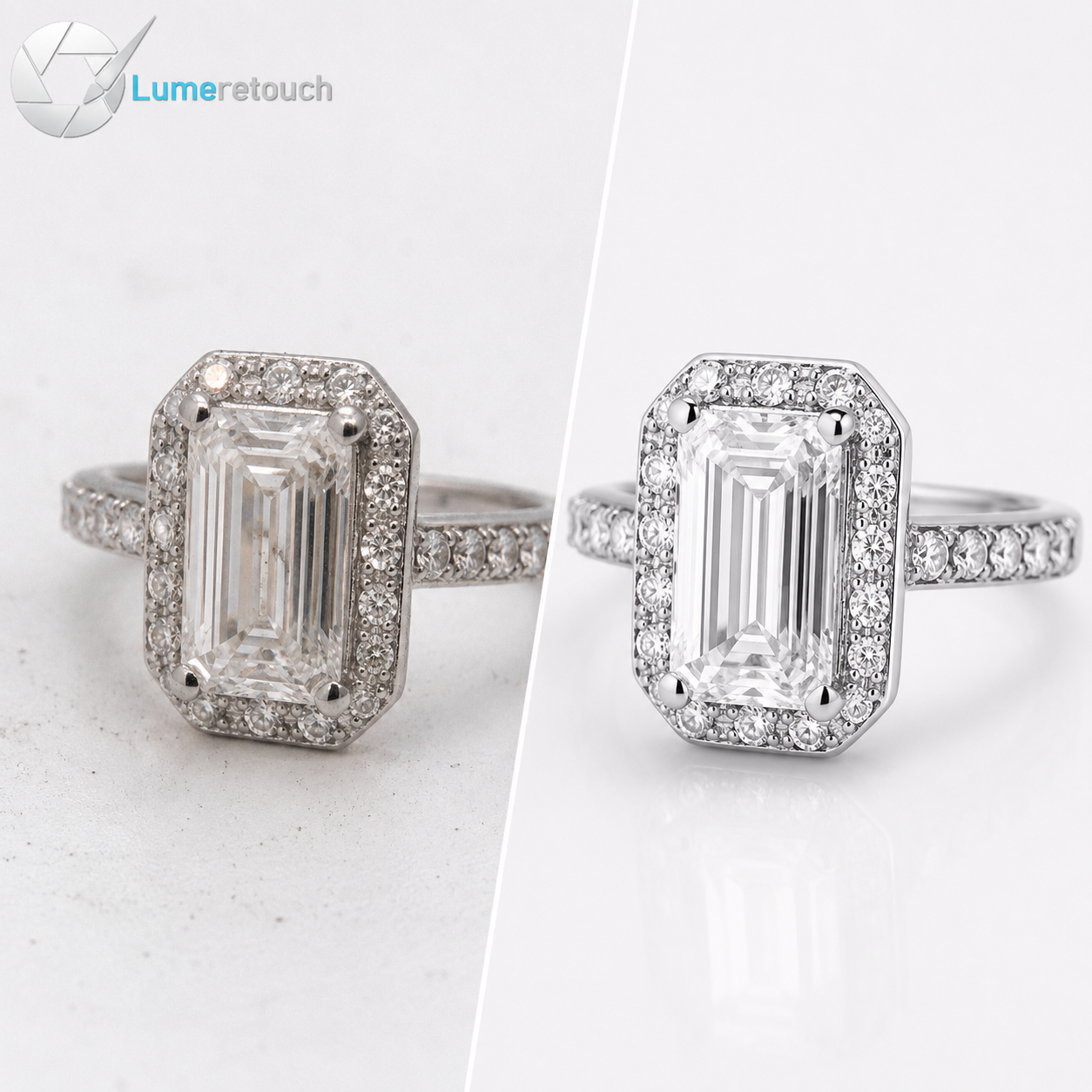
Jewellery photo editing for eCommerce turns raw, dull jewelry shots into bright, accurate, sale-ready images by fixing color, removing dust, enhancing gemstones, and cleaning up backgrounds. If your jewelry photos look flat, foggy, or inconsistent, editing is the fix, not a new camera. This guide walks you through every technique, from clipping paths to diamond retouching, so you know exactly what professional editing involves. You’ll also learn when it makes sense to outsource the work instead of doing it yourself. By the end, you’ll know how to make your jewelry listings look like they belong on a luxury shelf, not a phone screen.
What Is Jewellery Photo Editing?
Let’s start simple. Jewellery photo editing is the process of taking a raw jewelry photograph and refining it until it looks clean, accurate, and genuinely attractive to a buyer. Think of it as the difference between a diamond ring photographed under harsh kitchen lighting and that same ring glowing under a jeweler’s loupe. Same product, completely different impression.
We’ve worked with photographers and jewelry brands for years, and here’s something we’ve noticed over and over: even the best camera and the best lighting setup still leave you with photos that need work. Metal picks up weird color casts. Gemstones lose their sparkle under studio lights. Dust sits on a diamond and nobody notices until the photo is blown up on a website. Jewelry photo retouching closes that gap between “captured” and “camera-ready.”
Unlike editing a t-shirt photo or a pair of sneakers, jewelry editing demands precision at a tiny scale. A scratch that’s invisible to the naked eye becomes obvious once a customer zooms in on a product page. That’s why jewelry image editing isn’t just a nice-to-have for luxury brands — it’s a baseline requirement if you’re selling online.
Why Professional Jewelry Photo Editing Matters for eCommerce
Here’s a truth we’ve learned from editing thousands of jewelry images: people don’t buy jewelry, they buy the feeling jewelry gives them. And that feeling starts the moment they see your photo, not when the package arrives.
If your product photo looks dull, uneven, or slightly off in color, a shopper’s brain registers “cheap” in under a second — even if the piece itself is solid gold with a flawless stone. That’s the real cost of skipping professional jewelry retouching. You could have the best product in your category and still lose the sale because the image didn’t do it justice.
There’s also a trust factor at play. Buyers can’t touch or try on jewelry before ordering online, so the photo becomes their only source of confidence. eCommerce photo editing that shows true color, sharp detail, and a clean presentation builds the kind of trust that turns browsers into buyers. We always tell our clients: your photo is your salesperson, and it never gets a second chance to make a first impression.
There’s a practical side too. Marketplaces like Amazon and Etsy have strict image guidelines — pure white backgrounds, accurate color representation, no watermarks or props that mislead. Skip proper jewelry product photo editing and you risk listing rejections, return disputes, or complaints about the product “not matching the photo.”
Common Problems in Jewelry Product Photos
Before we get into fixes, let’s talk about what actually goes wrong. Over years of retouching jewelry images, we keep seeing the same handful of issues show up again and again:
- Dust and micro-scratches — Jewelry attracts dust like nothing else, and studio lighting makes every speck visible.
- Reflections and glare — Shiny metal and polished stones bounce back lights, cameras, even the photographer’s hand.
- Dull or cloudy gemstones — Diamonds and gemstones often look grey or lifeless straight out of the camera.
- Uneven or inaccurate metal color — Gold can look brassy, silver can look blue-tinted, rose gold can look pink instead of warm.
- Messy or distracting backgrounds — Props, shadows, or busy backdrops that pull attention away from the piece.
- Inconsistent style across a catalog — One ring looks warm and bright, the next looks cool and flat, and buyers notice the mismatch.
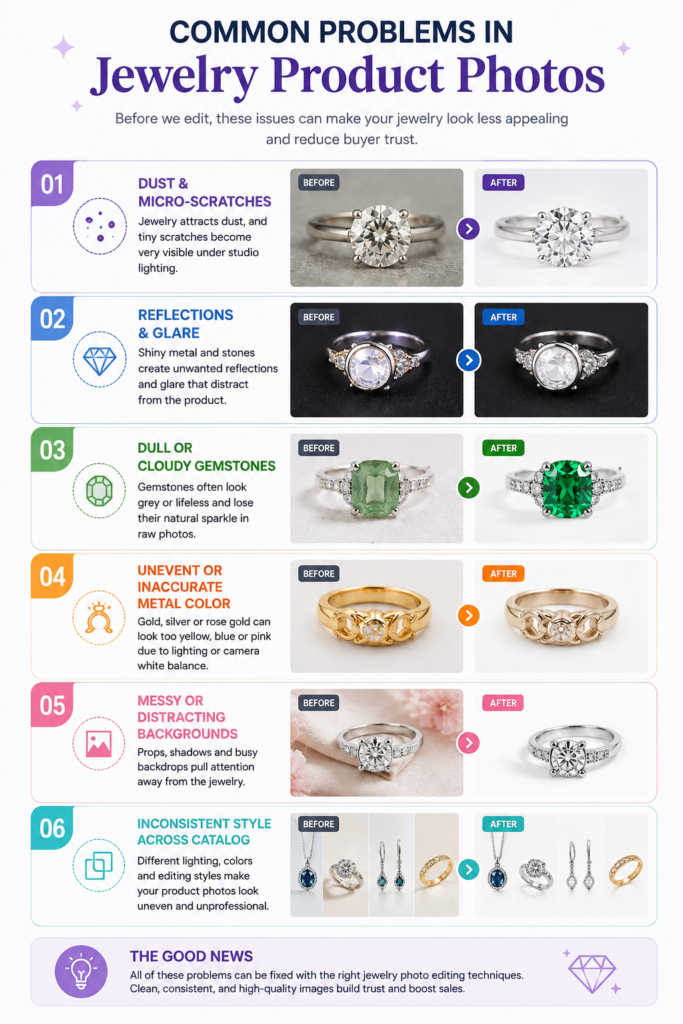
Sound familiar? If you’ve photographed even a handful of jewelry pieces, you’ve probably run into at least three of these. The good news is that every single one is fixable with the right jewelry photo editing techniques.
Essential Jewelry Photo Retouching Techniques
Now let’s get into the actual craft. These are the core techniques we rely on for every project, whether it’s a single engagement ring or a 500-piece bulk order.
Background Removal and Clipping Path for Jewelry
This is where most editing projects start. Jewelry background removal clears away cluttered backdrops and replaces them with a clean white or transparent background — exactly what Amazon, Shopify, and Etsy expect. For pieces with intricate shapes like chains, filigree rings, or dangling earrings, a simple cutout tool won’t cut it. That’s where clipping path comes in: a hand-drawn path traced around every curve, prong, and link so the edges look razor-sharp instead of jagged or fuzzy.
We always tell newer clients this: automated background removers are fine for a plain bracelet on a flat surface, but the moment you’re dealing with chains, gemstone clusters, or open metalwork, manual clipping paths are non-negotiable. Machines still struggle with fine detail, and jewelry is nothing but fine detail.
Jewelry Color Correction and Metal Retouching
Jewelry color correction is where accuracy meets art. Gold needs to look genuinely gold, not orange or muddy. White gold and platinum need a crisp, cool tone without looking blue or grey. Rose gold needs warmth without tipping into pink.
Metal retouching also means smoothing out uneven tones caused by studio lights, evening out reflections without erasing the natural shine, and removing tarnish spots or fingerprint smudges that show up more than people expect. The goal isn’t to make metal look fake or overly polished — it’s to make it look like what a customer would see if they held the piece in natural daylight.
Diamond and Gemstone Enhancement
This is genuinely one of our favorite parts of the job, honestly. Diamond photo retouching and gemstone enhancement bring out the sparkle, clarity, and color that a camera often fails to capture. A diamond in real life throws light in a dozen directions at once; a camera sensor flattens all of that into a single, sometimes dull, image.
Through careful contrast work, highlight enhancement, and color grading, we bring back that fire and brilliance without crossing into misleading territory. There’s an important line here — enhancement should reveal what’s genuinely there, not invent facets or colors that don’t exist. Buyers deserve an honest representation, and honestly, it also protects you from returns and complaints down the line.
Reflection, Glare, Dust and Scratch Removal
Dust removal from jewelry photos and scratch removal from jewelry photos sound like small details, but they make or break the final image. A single dust particle on a diamond, blown up to full screen size, looks like a flaw in the stone itself. A tiny scratch on a ring band looks like damaged goods, even when the actual piece is brand new.
Reflection and glare removal is trickier. Metal and polished stones reflect everything around them, including studio lights, ceiling fixtures, and sometimes the camera itself. Skilled retouchers manually rebuild these reflective surfaces, patch by patch, so the shine looks natural instead of blown-out white or awkwardly patchy.
How to Edit Jewelry Photos Step by Step
If you want a general roadmap for how to edit jewelry photos, here’s the order we typically follow on every project:
- Inspect the raw image for dust, scratches, and lighting issues before touching anything else.
- Remove the background using a clean clipping path suited to the piece’s shape.
- Correct color and white balance so metal tones read accurately.
- Retouch the metal surface, smoothing tone while preserving natural texture and shine.
- Enhance gemstones and diamonds, bringing back sparkle and clarity.
- Remove dust, scratches, and unwanted reflections with fine detail work.
- Add or refine shadows for depth, so the piece doesn’t look like it’s floating.
- Run a final quality check against marketplace requirements and brand style guides.
Following this order matters more than people realize. Editing color before cleaning up dust, for example, often means fixing the same spot twice. A consistent workflow is exactly how studios keep hundreds of images looking uniform across a single catalog.
How to Optimize Jewelry Images for Shopify, Amazon and Etsy
Each marketplace has its own quirks, and knowing them saves you from rejected listings and wasted revisions.
Amazon requires pure white (RGB 255,255,255) backgrounds for main product images, with the product filling at least 85% of the frame. No text, no watermarks, no extra props in the main shot.
Etsy is more flexible with backgrounds and lifestyle shots, but buyers on Etsy expect a handmade, authentic feel — so overly artificial retouching tends to backfire there. Natural-looking color accuracy matters more than a glossy studio finish.
Shopify gives you full creative control since it’s your own store, but consistency across your entire catalog matters even more here, since there’s no marketplace template forcing uniformity. A mismatched image style across your product grid looks unprofessional fast.
Across all three, the constants stay the same: accurate color, sharp detail, clean edges, and images that load fast without losing quality. That’s the core of solid jewelry product image editing, regardless of platform.
DIY vs Professional Jewelry Photo Editing
We get asked this constantly: can you just do it yourself with a smartphone app? Honestly, sometimes yes. If you’re selling a handful of simple, budget pieces and speed matters more than polish, a basic app might get you by.
But here’s where DIY editing usually falls apart:
- Time. Editing one jewelry photo properly can take 15–40 minutes by hand. Multiply that across a catalog of 200 pieces and you’re looking at days of work you probably don’t have.
- Consistency. Getting one photo to look good is one thing. Getting fifty photos to look identical in tone, shadow, and background is a completely different skill.
- Fine detail work. Clipping paths around delicate chains or removing a scratch without damaging surrounding texture takes real training. Most DIY tools simply aren’t built for that level of precision.
- Marketplace compliance. Getting backgrounds, dimensions, and color profiles exactly right for Amazon or Etsy takes experience most business owners don’t have time to build.
Professional jewelry retouching earns its cost back through higher conversion rates, fewer returns, and a catalog that actually looks like a brand instead of a hobby.
When Should You Outsource Jewelry Photo Editing?
In our experience, there’s a clear tipping point. If you’re editing more than 20–30 images a week, spending more time in editing software than running your actual business, or noticing inconsistency across your product photos, it’s time to consider outsourcing.
This is exactly the gap we built our service to close. At Lume Retouch, we combine skilled manual retouching with AI-assisted tools to give you consistent, professional jewelry photo editing services at scale — without you having to learn a single editing program.
Here’s what that looks like in practice for our clients:
- 12–48 hour turnaround, so your listings don’t sit in a backlog
- Unlimited revisions until you’re genuinely happy with the result, no hidden fees
- Up to 40% bulk discount for larger catalogs, which matters a lot if you’re scaling
- Support for every format — JPG, PNG, PSD, TIFF, RAW — no conversion headaches
- A manual + AI hybrid workflow, which means precision on fine detail like prongs and gemstones, plus the speed to handle bulk orders efficiently
We work with jewelry brands, photographers, and eCommerce sellers across the UK, Germany, France, Netherlands, Switzerland, and the rest of Western, Northern, Southern, and Eastern Europe, along with clients in the US, Canada, Australia, and the UAE. Whether you’re a solo Etsy seller in Dublin or a growing jewelry brand in Berlin shipping across the EU, our process stays the same: personal attention, no cookie-cutter edits, and images that actually reflect the quality of what you’re selling.
If you’ve been putting off outsourcing because you’re not sure it’s “worth it” yet, ask yourself this: how much revenue is a dull, inconsistent product photo quietly costing you every single day it stays live?
Frequently Asked Questions
What is jewelry photo editing and why does it matter for eCommerce?
Jewelry photo editing is the process of correcting color, removing background clutter, and enhancing gemstones and metal in product photos. It matters because buyers judge jewelry quality almost entirely through images, and poorly edited photos directly hurt conversion rates.
How much does professional jewelry photo editing cost?
Pricing usually depends on complexity, volume, and turnaround speed. Simple background removal costs less than detailed diamond enhancement or full retouching. Bulk orders typically qualify for discounts of up to 40%, making per-image cost much lower at scale.
How long does jewelry photo editing take?
Most professional services deliver within 12 to 48 hours, depending on order size and complexity. Rush requests are often possible for smaller batches, while large catalogs naturally take longer to maintain quality.
Can jewelry photo editing fix scratches, dust, and reflections?
Yes. Skilled retouchers can remove dust particles, minor scratches, and unwanted glare or reflections without damaging the natural texture or shine of the metal and gemstones.
Should I outsource jewelry photo editing or do it myself?
If you’re editing occasionally and have basic skills, DIY can work for small batches. But once you’re managing a growing catalog, need consistency across dozens of images, or want marketplace-compliant results, outsourcing to a professional service saves time and typically pays for itself through better conversions.
Ready to Upgrade Your Jewelry Photos?
At Lume Retouch, we help jewelry brands, photographers, and eCommerce sellers across Europe and beyond turn raw product shots into polished, sale-ready images. From background removal and color correction to diamond enhancement and bulk catalog editing, our manual + AI hybrid workflow delivers consistent, professional results in 12–48 hours, with unlimited revisions until you’re fully satisfied.
Get in touch today for a free consultation and custom quote, and let’s make your jewelry catalog look as good as the pieces themselves.